Category: ReliabilityX Blog

  • Self-Accountability Part 2

    Self-Accountability Part 2

    Step 1: Know your role and your responsibilities

    The first step in creating more self-accountability is to start by making an assessment of what your role is and what those specific responsibilities are.

    If you’re a father, your role and responsibilities are very different than if you’re the head of an emergency room, or if you’re coach of a basketball team. Every area of your life can have different roles, but the responsibilities of being a father, for example, can impact the responsibilities of being an entrepreneur. You will need to think about how late nights in the office can affect missing Timmy’s baseball game into your plan.

    No matter what your specific role is, you need to sit down and describe specifically what your responsibilities are. Without explicitly stating what your responsibilities are, you will never be able to hold yourself accountable.

    When you’re making this list of responsibilities, you’re going to break down each broad responsibility into the specific and measurable components that combine to form the responsibility. If the components are not specific, you won’t know that you’re working towards them, and if they’re not measurable, you won’t know if you’re succeeding or failing.

    Within each of these components that make up the responsibility, there’s going to be tactical strategies that will get you closer to the goal. These will be things that will be more day-to-day, so you can take down a larger goal one piece at a time.

    In practice, it could look like this:

    Role: A Father & Husband

    Responsibility 1) Make sure the family is financially stable

    Component A) Pay off wife’s student loan debt in 3 years

    1. Restructure current debt to reduce interest rate
    2. Add $50 more per payment to shorten duration to pay

    Component B) Increase income by $15,000 this year

    1. Pick up an extra shift every other weekend
    2. Earn a professional credential that raises your salary within the next six months

    III.          Help wife start tutoring local students

    Component C) Decrease spending by $1000 per month

    1. Pack lunch every day, saving $100/week
    2. Explore free hobbies that the kids enjoy

    Responsibility 2) Improve the family’s relationships

    Component A) Make routines more consistent

    1. Eat dinner together 5 nights a week

    Ii. Start a monthly tradition (family outing etc)

    Component B, C, D etc…

    You start by creating a list of just the responsibilities that the role requires: are you making sure that there are no injuries on the shift you supervise, reducing waste, mentoring junior employees, any imaginable amount of realistic responsibilities for whatever role you’re in.

    The four kinds of accountability mentioned at the beginning of the chapter should spark some creativity for responsibilities that might not be immediately obvious. The second shift supervisor is directly accountable to the Operations Manager he reports to, but he also has responsibilities to not setup the third shift supervisor for failure. If second shift is above quota every day, but third shift has started falling behind it means that somewhere, something is going wrong.

    Once you have the responsibilities, break them down into the components that would lead to success in that responsibility. Then break down each component into whatever metrics would be considered success in that component. This is where you’re going to focus your daily effort.

    Once you have broken down the strategic (higher level) into the tactical (day-to-day) steps necessary to move forward, now you have something that you can focus on every single day.

    Every day, you can look back and ask yourself if you were taking the steps necessary to get to the end position you want to be in, and this is what self-accountability is all about.

    This list of responsibilities is a document that should be referenced as often as necessary to get where you want to go. You should reassess the strategic level goals every three, six or twelve months to make sure that you’re still on the right general path.

    You should be checking weekly or every other week to see if you’re doing the tactical steps that will feed into the responsibilities success. If you spend two weeks without having done a single daily step, it’s critical to take a look at why you weren’t able to.

    This is where the self-accountability comes into play. If you are looking at getting back into shape as a goal, and you spend 2 weeks without exercising once, then there’s feedback that something needs to change. It’s important to note that this doesn’t mean that you’re instantly a failure and it’s time to give up all together.

    If your excuse was that you forgot your gym clothes at home, start putting a gym bag with two sets of clean work out clothes in the trunk of your car. If your gym is 30 minutes away, change your protocol to “if I don’t go to the gym on this day, I need to do 50 pushups before I can turn the TV on at home”.

    Continued…

  • Self-Accountability Part 1

    Self-Accountability Part 1

    In the last blog, we discussed why Self-Awareness is the starting point for any real change. If you aren’t able to honestly know where you are, you’ll never get on the proper path towards where you want to go. The next step in making forward progress is understanding how you got to where you are.

    This is where self-accountability comes into the conversation.

    Simply put, self-accountability is the understanding that you are the combined result of all of the decisions you make, and actions that you take.

    Throughout life, there’s roughly a 90/10 split on how much of life is based on your decisions, and 10% of what happens to you in life is just out of your control.

    For example, on the first day of your new job, you can go to sleep early, get your lunch prepared, have any paperwork needed for HR, time out your commute with plenty of slack in case traffic is worse, make sure you have a full gas tank so you make good time, but if you get in a car accident on the way, that’s just out of your control.

    The trouble most people have is that we spend the vast majority of our effort on the 10% that’s just beyond your control. People will blame circumstances, luck or whatever puts the burden of responsibility on anything but themselves.

    The reality is that the 90% portion is the only thing you have control over: if you can’t control it, it’s not worth worrying about, because you can’t control it.

    Once we’ve accepted the reality that the 10% is just out of our control, we get into self-accountability, and we’re able to start making serious progress on changing the path we’re on.

    As we move forward with accountability, it’s important to understand that there’s four general types of accountabilities.

    1. Individual Accountability: this is when one person is a part of the solution, for example, a coach who’s responsible for other people’s growth.
    2. Reciprocal Accountability: This is a group being individually responsible for a single goal, for example, the first, second and third shift managers of a single factory line. If second shift leaves a large mess, that can affect third shift’s productivity even though it might not be their fault.
    3. Team Accountability: This is how everyone on the sales team is responsible for hitting the quota, and the failure of the team as a whole is unacceptable, even if there are specific people who performed well enough.
    4. Self-Accountability: This means that you are responsible for your own choices and actions. You are the first and last line of defense for your own integrity.

    These four distinct areas of accountability can demonstrate the ways that you can have a single boss at your job, but that doesn’t mean you are only responsible to them. Salesmen might report into a sales manager, but if they can’t produce the revenue to cover payroll, the salesmen will find there’s quite a few people that rely on them!

    Every one of the components discussed in this blog can be difficult to implement, but self-accountability is the toughest for many people. It’s not a common trait to be able to look yourself in the mirror and not only know that you’re responsible for the vast majority of your problems, but that you’re the only one who has the power to fix them. The benefit to that skill is once you’re able to admit to yourself you can fix the problems, the solutions to those problems can start to show themselves, and they aren’t as big of problems to face as you originally thought.

    Now that we’ve outlined what self-accountability is we can talk more about what we can do to make ourselves more accountable. Luckily, we have a three-step plan to do just that!

    Continued…

  • CMMS Principles for Success

    CMMS Principles for Success

    First published in Plant Services August 2020.

    Arguably, at the cornerstone of any sound asset management, reliability, or maintenance strategy is the Computerized Maintenance Management System (CMMS). From selection to setup and utilization through data analysis and continuous improvement, your CMMS plays a major role in your success in maintenance and reliability. As such, a poorly designed CMMS implementation can be a major inhibitor to achieving success. Over the years I have been fortunate enough to gain some experience in the arena. Some of those experiences have gone extremely well. Others have taught me lessons in what not to do a second time.

    Let us look at some principles for implementation and utilization success. When you are finished reading this, and the rest of the amazing content in Plant Services, I encourage you to drop this on the desk of others who may need it. Or, better yet, send them a subscription.

    Implementation Principle One: Do not be in a hurry when it comes to selection

    Manufacturing operations have literally hundreds of CMMS options to choose from. The ultimate decision may have lasting effects, as you will likely be with this system a minimum of five years. Considering the additional work involved in migrating from one system to another, your company is likely to stick with this decision unless it encounters serious issues with the legacy system.

    The overall selection process should include a Request for Information (RFI), where you ask general questions regarding functionality to ensure only vendors who can meet your needs move along the selection path. Questions within the RFI should be written clearly, such as, “Does your solution have out of the box functionality to automatically generate PM work orders based on meter reading inputs that hit an action limit set by user?” For each question within the RFI, the vendor should be directed to expand on the answer. Stay away from vendors who simply provide Yes/No answers. RFI responses should be scored to develop a shortlist of vendors who will provide demonstrations of their systems.

    Create a scripted demonstration for your potential vendors to follow as part of their demos. What does this mean? Do not rely on their demos alone. They will likely demonstrate using previously created records, which does not help you truly understand how user friendly the system is.  Below is a sample basic script. Be sure your script touches on areas that you are interested in, which may include reporting capabilities.

    1. Create a location record (if system uses location records).
    2. Create an asset/equipment record assigned to a location from step one.
    3. Create an inventory record.
    4. Create a basic job plan with two tasks and assign the inventory record from step three.
    5. Create a PM record for an asset/equipment from step two and assign the job plan from step four.
    6. Generate the PM work order and show the inventory record reservation.
    7. Assign the work order and walk through to completion with the steps.
    Implementation Principle Two: Know your needs

    Management may expect you to use the capabilities that exist within an existing ERP system. Ensure the functionality meets your needs, helping you to see value and make business decisions. Evaluate the existing ERPs capability in this space as you would when selecting any other system. Remember, just because you can put a table in a Word document does not mean you can do without Excel. You need a system that can deliver results. A list of user requirements will help ensure results..

    A User Requirement Specification (URS) contains the needs of the business – what capabilities must exist or what information should be required on different record types. While this may need some revisions based on the system you ultimately choose, it is recommended to have a URS before final vendor selection. Also, vendors can use the URS to help develop the statement of work and provide a more accurate estimate of costs.

    Implementation Principle Three: Take advantage of the opportunity

    An upgrade or change of CMMS provides a great opportunity to improve data quality and processes associated with work execution. Take advantage of this. Ensure your equipment hierarchy is accurate, fix naming and numbering conventions, and standardize value lists. Taking the time to ensure data quality will pay dividends throughout the lifecycle of the new system.

    In addition to data quality, an upgrade or new CMMS implementation is also a great time to assess best practice processes for managing maintenance work. Ensure the new system contains enough work order statuses to align to your business process. A good rule of thumb is this: each status should be owned by only one role in the maintenance org chart. The maintenance manager should know exactly who to call by a work order’s status. If in “Planning,” call the planner. If in “Awaiting Materials,” call the storeroom. Each role may have multiple statuses, but each status should belong to only one role.

    Implementation Principle Four: Standardize what should be standardized

    This is particularly important if you have multiple locations. Value lists such as statuses, equipment classes, or priorities should be standardized to ensure clean data reporting. Equally important will be decisions such as using smart numbers or auto numbers for records. My recommendation is to avoid smart numbers wherever possible. Inevitably they lead to being forced to modify the logic to accommodate what was not thought of before or due to exceeding character limits.

    Implementation Principle Five: If you want it, require it

    Data quality will have a direct impact on your reporting, performance tracking, and deeper data analysis. If you expect downtime to be tracked for breakdown maintenance, require it. If you need failure reporting to be utilized, require it. Assurance of available data will provide greater datapoints and should improve accuracy.

    There are two methods for data requirements: system enforced required fields and process enforced required fields. Clearly, system enforced required fields ensure the data will exist. However, some systems lack the ability to do this conditionally. For instance, if you want only corrective orders to have failure codes, but the CMMS you have chosen does not provide that capability, you may be forced to acquire the data through process. While less accurate, you can use reporting methods to monitor this behavior until it is instilled in the organization. Develop a report to track percentage of corrective orders with failure codes and a detailed report by technicians, so you can coach those who may need to improve.

    Utilization Principle One: Training, Training, Training

    Probably the most critical step in ensuring CMMS success will be training. Carefully consider several factors here, such as the length of training for each user role, how training will be delivered, and what additional resources should be available to users after training.

    In person or virtual live training should be role based to ensure users are not required to sit through functional learnings they will not use. Training, where possible, should allow users to do live training in a replicated environment. Watching the instructor use the system will have limited success.

    Online training modules where users must enter information and follow along are effective for step by step instruction but do not allow for questions or deeper dives into functional capabilities. It is recommended to use online training modules as refresher or online help.

    Utilization Principle Two: Listen to the users

    Feedback on functional capabilities, points of frustration, and/or system glitches should be considered critical. Although you may not be able to deliver all of the functional capabilities users may request, getting a handle on their needs will provide the basis for either business process changes, system changes, or even tickets back to CMMS vendor if the system is not performing as designed. When users provide feedback be sure to communicate the status and where the request sits in the priority list. If requests are, seemingly, ignored, users will stop providing feedback. While this may lighten the load, it will not continually improve your CMMS utilization.

    Utilization Principle Three: Do not skimp on system administration

    Another huge point of failure in CMMS utilization is a fundamental lack of understanding when considering the volume of administrative work to keep the system clean. From work orders, inventory, PMs, task lists, and equipment records, someone needs to keep it all together. Consider this scenario: if when replacing a pump the equipment record is not decommissioned and a new equipment record created, all of the costs associated with the replaced pump will be included in the new pumps lifecycle cost.

    From cycle counting to equipment replacements, it’s important to ensure that the system you have spent a significant amount of money on stays clean. Over time, an unmanaged system will become frustrating for users as they weed through records that should no longer exist or cannot find records that should exist. A disorganized system is one that will lack utilization.

    Utilization Principle Four: All work must be a work order

    Let’s face it, this is probably one of the more difficult principles to achieve. It’s also the most important. The CMMS should be much more than a filing cabinet. It doesn’t exist only to remind us to do PMs or issue parts. At its core, the CMMS is designed to provide information to help manage assets. This includes an understanding of costs, reliability, MTTR, and many other points of data for analysis. Unless all work is accounted for, the data is skewed. If technicians are tapped on the shoulder to perform work and a work order is not generated, the data is lost. In my estimation and based on years of teaching both planning and scheduling and CMMS utilization, the average organization accounts for about 40% of technician time within the CMMS. If this is true, the data used for analysis is lacking substantially.

    Let’s consider a common analysis within the CMMS, such as top 10 lists for cost and reactivity. You pull the data and see which assets are costing the most and which are the most reactive on-site. You take this information to the engineering department and ask to have these assets put on the capital plan for replacement. Sounds like a good strategy. Except the data could be significantly different if all the work was accounted for. I recall, when working for a previous employer, who expanded the cafeteria and added 27 drains to an existing system without increasing the grease trap size or main drain size. We went from spending minimal time maintaining the system yearly to literally having to chop up grease in the lift station because it was passing the trap. We were able to prove a yearly cost increase of $25K, go back to engineering with this information, and justify the spend to increase the trap to adequate sizing.  We would not have been able to win the battle if we did not account for our work. All other data in the CMMS is inaccurate if you are not accounting for all work.

    Utilization Principle Five: Track all costs

    A step further than just accounting for the work is accounting for all costs. Costs associated with a technician’s time is common. Parts costs are also common, but sometimes lacking if the use of P-Cards is allowed or too frequent. Less common is capturing service related PM and repair work, equipment rentals, and vendor costs associated with collecting condition monitoring points. Learn how your CMMS can help track these costs. Commonly, a service requisition (similar to a parts requisition) can be generated with a PO issued and assigned to one or more assets. Work orders generated against the PO, when closed, act like parts receipts allowing invoicing to go against the PO and costs to be assigned to the equipment. This works for many CMMS solutions and for service contracts as well.

    Tracking all costs will allow for more accurate lifecycle costing models and help integrate into your capital replacement strategy. Getting to this level will allow you to flex your CMMS muscle and have a more respected seat at the table when it comes to capital planning.

    Hopefully, these principals for CMMS implementation and utilization help guide you as you continue your journey toward reliability sustainability. For more information contact me at ask@reliabilityx.com

    Use the comments section on the web version of this article to provide your feedback on additional principles that should be included in this list. We would love to hear your feedback.


  • 7 Steps of Clean, Inspect, & Lubricate

    7 Steps of Clean, Inspect, & Lubricate

    Through daily inspections, cleaning, and lubrication practices we can measure, prevent, and restore deterioration to our equipment. The expectation is that a team is put together made up of maintenance, operations, and leadership employees to roll out strategy beginning with one piece of equipment. They will implement the following 7 steps:

    • Initial Cleaning
    • Eliminate sources of dirt and hard to clean & inspect areas
    • Create and maintain cleaning, inspection and lubrication standards
    • General Inspection
    • Operator Inspection
    • Activities standardized
    • Team Development and Operator Driven Reliability

    Step 1: Initial Cleaning

    1. Planning for initial cleaning
    2. Initial cleaning and defect identification preparation and planning (Log for tracking defects tied to work orders)
    3. Initial cleaning activities
    4. Defect identification logging through work order creation and promotion of continuous defect identification
    5. Introduction of first temporary standard
    6. Continuous follow up on completion of work orders related to found defects

    Step 2: Eliminate sources of dirt and hard to clean & inspect areas

    1. Analyze sources of dirt and hard to clean areas
    2. Implement solutions, update cleaning standard, monitor results
    3. Improve difficult to inspect areas

    Step 3. Create and maintain cleaning, inspection and lubrication standards

    1. Create and maintain cleaning and inspection standards
    2. Study the lubrication system
    3. Simplify the lubrication system
    4. Create a visible lubrication system
    5. Introduce a lubrication schedule
    6. Train the operators
    7. Monitor results

    Step 4. General Inspection

    1. Have leaders study the equipment
    2. Train the operators
    3. Apply everything learned about the equipment and solve problems
    4. Promote visual management
    5. Define inspection standards
    6. Check results

    Step 5. Operator Inspection

    1. Integrate cleaning and lubrication standards with General Inspection and introduce basic points
    2. Prepare checklists for full implementation by all shifts, all operators
    3. Implement Visual Management at operational level
    4. Promote communication and start Team Performance Control System (Metrics to measure how well the implementation going and meetings to analyze successes and opportunities)
    5. Check results from past to today

    Step 6: Area Activities Standardization

    1. Assess current operational standards and update them
    2. Apply 5S to work area
    3. Identify basic losses relating to equipment
    4. Systematically eliminate defects by applying Problem Solving Tools
    5. Develop a Weekly Team Performance Control System (Meeting to create action item lists, assigning people and dates for completion of tasks, and follow up and review. Also, create visible metrics to show area operations your progress)

    Step 7: Team Development and Operator Driven Reliability

    A. Integration & Management

    1. Integrate activities and Safety, Quality, and Maintenance Controls
    2. Apply suggestion system
    3. Manage the area’s material flow
    4. Develop a high value added Data Collection System
    5. Achieve 100% conformity to improve MTBF, MTTR, and other associated losses
    6. Develop a Daily Team Performance Control System (Daily Morning meeting to discuss performance, list top 3 factors needing problem solving tools applied, and follow up on outstanding tasks needed to be complete.)

    B. Analysis of Losses

    1. Analyze area costs and losses
    2. Apply Problem Solving tools to highest priority losses
    3. Identify and analyze hidden losses
    4. Identify countermeasures to eradicate hidden losses
    5. Acknowledge the area improvement targets, plan for improvement, and follow up actions
  • Clean to Inspect for Best in Class Operator Care

    Clean to Inspect for Best in Class Operator Care

    Cleaning is an important first step in Operator Care and reliability gains because:

    • Insufficient cleaning causes losses and
    • The cleaning activity itself exposes hidden defects

    Dirt in rotating parts, sliding parts, pneumatic and hydraulic systems, electrical and control systems, sensors, etc. causes malfunctions, reduce function, failure by wear, clogging, resistance, speed losses, etc. are different types of defects. Defects are anything that is abnormal from the expected ideal condition. Insufficient cleaning causes forced deterioration. All these losses are solved through a thorough cleaning of equipment and countermeasures to keep the equipment clean.

    Defect Identification while cleaning

    Since the key reason for cleaning is to identify abnormalities while cleaning, it is important to understand how to do this. Abnormalities will be found both while cleaning and ideally while the line is running since many abnormalities are undetected when the equipment is down. Anyone can find an abnormality through the use of their senses (touch, smell, see, hearing). Individuals on the team should become like human sensors. This thorough approach increases the chances of detecting hidden abnormalities such as abnormal vibration, noise, odor and overheating just to mention some. (Notice all of these can only be detected during equipment operations)

    Today, many defects are hidden because the equipment is dirty. Equipment inspections fail to expose these “hidden” defects. By cleaning the equipment thoroughly, we expose every defect. The key concept is: Cleaning is Inspection. When we clean, we touch every part of the equipment and therefore inspect every part of the equipment. The analogy that is often used to describe this idea is that of washing your car. When you wash your car by hand, you see every dent & scratch.

    This “inspection by cleaning” process is part of the daily work while operating the equipment. This skill is developed, practiced, and improved and it becomes part of daily work and is used throughout the entire plant.

    Teams should expect to reduce losses as a result of their Operator Care activity. Daily equipment loss data provides the picture of current and ongoing losses. Priority can be put first on that part of the equipment that experiences the most losses.

    Ongoing, daily data can then be used to:

    • Assess loss elimination progress
    • Review failures as they occur
    • Focus the daily cleaning and inspection activities

    Daily data should include things such as: Number of touches (the amount of times a person has to physically do something to keep the equipment running as designed), Number of minor stops, breakdowns, etc.

    As they review the data, teams should ask themselves the following questions:

    • Should our activities have prevented the loss?
    • Was the loss caused by insufficient cleaning?
    • Was there a problem we should have detected while cleaning, but failed to see?
    • Are we cleaning and inspecting the right areas?
    • If we found a problem did, we fix it in time, or was it fixed incorrectly?
    • Is the cleaning we are doing having no effect on the operation of the equipment?
    • Are we cleaning items more frequently than needed to maintain ideal?

    From this assessment, the team should adjust their work.

    They may need to:

    • Focus their cleaning to inspect in critical areas
    • Adjust how they are handling the problems they find
    • Obtain some training on how to detect the type of problems that are causing the losses they have

    Cleaning sounds easy but here are a few things to think about before you start cleaning:

      1. Preparation:

    Most deep cleaning will require the operation to be down which means preparation is critical. The boundaries of the Operator Care activity need to be clear; before pictures should be taken, cleaning supplies(rags, cleaning solution) and tools should be available; safety maps and risk prediction forms should be available, MSDS’s should be reviewed for the cleaning solutions to be used.

      1. Cleaning techniques:

    First of all, the most contaminated areas must be cleaned thoroughly. Following some tips to be considered during cleaning:

      1. Clean from top to bottom, center to outside in order to keep already clean areas clean.
      2. Touch every part of the equipment
      3. Lids and safety panels must be opened and internal parts of the machine inspected, cleaned, and checked for looseness of bolts, screws, nuts, photo-eyes, etc.
      4. Clean all auxiliary parts of the machine
      5. All objects near the machine that are not necessary must be eliminated.
      6. Closing out the cleaning activities:

    3. After the team has completed the cleaning activity it is important that before they leave the area they:

      1. Check the area for tools, trash, etc.
      2. Capture after pictures
      3. Put supplies away
      4. Perform a test run

    4. Turnover of cleaning activities to line operations:

    At the end of a cleaning session, it is important to make sure that the equipment is ready for operation. A summary of the teams’ activities should be provided to the oncoming team in case issues arise later. Cleaning activities should not cause any type of loss to the line.

    1. The Cleaning should take place at the end of the shift with the goal of setting the next shift up for success.

    And finally, keep a record of how much time your team is cleaning. All cleaning time is a loss; ideal is 0. Any progress to eliminate effort loss on keeping the machine clean should be captured.

  • Asset Management Systems for Small Groups

    Asset Management Systems for Small Groups

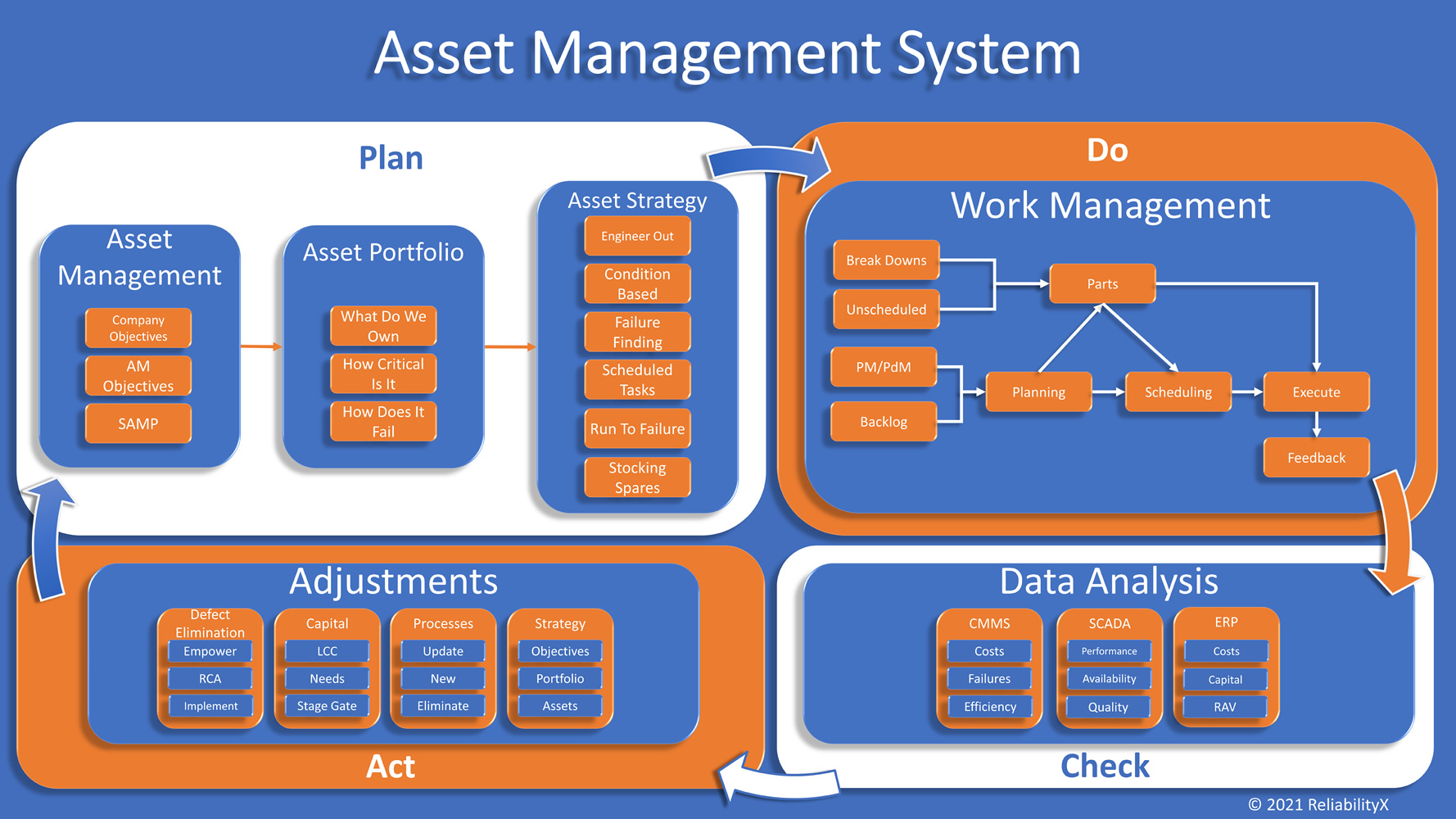
    An asset management system is comprised of all of the necessary processes, procedures, tools, systems, and methods necessary to meet business objectives in a manner which is controlled, measured, and improved upon.  The system, more often than not, takes on some visual representation as in the graphic below.  The purpose is to provide a simplified understanding of the overall process to meet asset management goals.

    The utilization of such a system generally allows an organization to develop standardized methods, train on those methods, and measure against the use and success of the methods.  These steps are typically seen as unnecessary or overkill to smaller organizations. Afterall, if you are the maintenance manager in control of 6 multi-craft technicians, why would you put in all the effort to utilize an asset management standard?  What benefit would such a small group see?

    Regardless of the size of the maintenance team, and asset management system can offer similar benefits.  In smaller teams, the asset management system may be less complex in the level of detail necessary to maintain control of the system but is it just as important to have control.  The asset management system’s level of detail should provide an organization with the ability to identify the right work against the right assets at the right time to ensure continued operation and achievement of company goals.  “Right” indicates understanding of what is important, what needs to be done, and how it will be completed.

    If you are the maintenance manager with a small team developing and implementing an asset management system may seem like a monumental task.  Afterall, you have a day job.  How can you develop the system, procedures, and tools necessary to implement?  I recommend starting with understanding.  There are many resources online and in books to help you understand the asset management system and component processes.  Do some research and find approaches to these elements which provide the right level of detail for your organizational size.  Remember, the goal is to create standards for the various components, not to make them overly complex.  You can improve them over time as necessary and as you mature as a group.

    Good luck!!

  • RCFA…What is the Problem?

    RCFA…What is the Problem?

    In all the years of facilitating RCFA, what seems like the easiest part has proven to be one of the most challenging.  Documenting the problem statement.  It is human nature is to immediately develop an opinion and provide a solution.  When a group of people are put in a room together for an RCFA they immediately believe they are there to solve THE problem.  This leads to a focus on solutions to the event as it occurred.  The team gathers in the room and the facilitator asks what the problem statement is, and the replies tell it all.  “Jane, the operator, hit the wrong button.”  “The technician didn’t know how to install the bearing.”  “Poor lubrication.”  Sound familiar?

    While these will likely end up on your RCFA as causal factors in some way, they are not problem statements.  When constructing the problem statement there are a few things to consider.  First, the problem statement should be directly tied to business goals.  For example, “loss of production” or “Safety risk elevated”.  The goal is to be simple in the problem statement and reduce the amount of time trying to document it.  Too much time is often spent trying to articulate a problem statement which includes a causal factor that people believe to be the root cause.  This takes away time to map out your causal factors and get to latent and systemic layers in the allotted time.

    Additional details regarding a specific event or recurrent event should also be documented.  These attributes may include:

    • Date(s) of event
    • Relative timing (shift, season, etc.)
    • Number of actual occurrences if applicable
    • Cost to the business per event
    • Safety impact per event
    • Quality impact per event
    • Maintenance impact per event

    Documenting these details helps to understand the total business impact of either individual or recurring events and provides better clarity into what can be invested to help eliminate or reduce probability of reoccurrence.  These details while not part of the problem statement, are part of the problem details.

    So, keep your problem statement short, sweet, and connected to business impact.  Document problem details so you have better understanding of total impact.  And, save some time which can be better utilized getting into the detailed causal factors.

  • Understanding Plant Losses

    Understanding Plant Losses

    The Way Losses are Calculated
    and OEE/TEEP Calculation

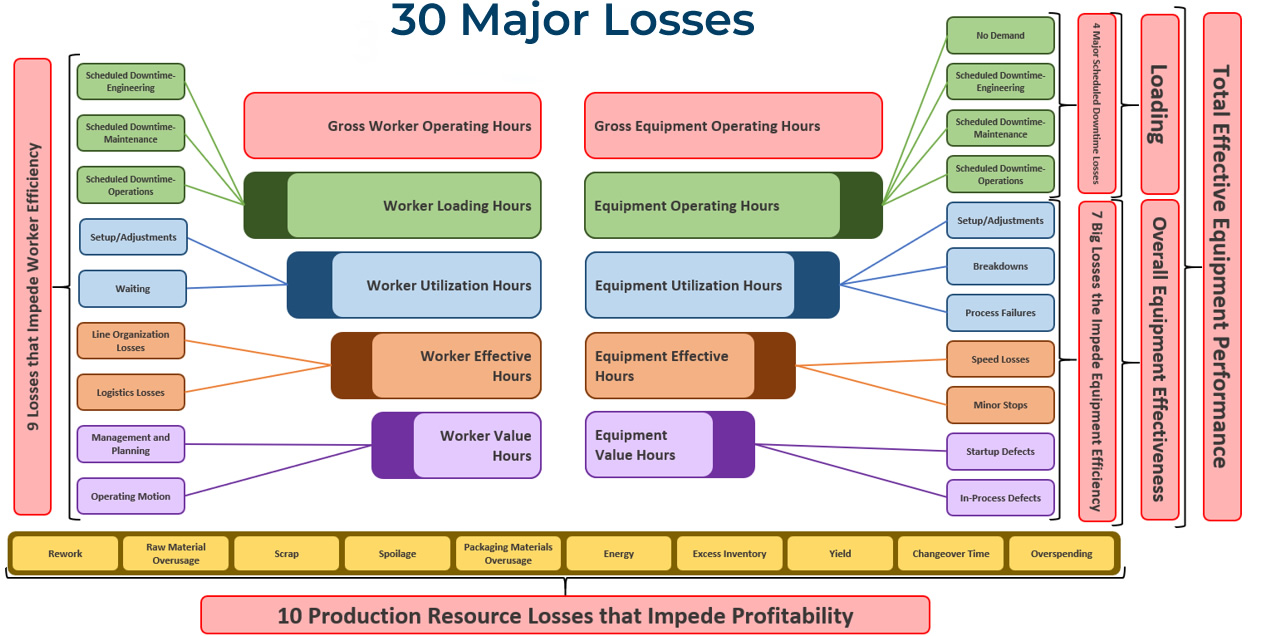
    In order to get a broad, clear picture of where to focus, you have to view your whole plant as a large system of fully manageable processes. No matter your role, your job is to improve plant processes, helping to produce the highest quality product, at the lowest price possible, in the safest manner. In order to see this big picture, you have to be honest and expose true problems within your facility. From that perspective, you will be able to recognize the different types of losses in your plant and how to secure significant gains in productivity by controlling those losses.

    How to determine where to focus

    The examples in this article use weekly numbers, but the same analysis can and should also be applied monthly, quarterly, and annually. Here we will look at how we apply metrics to some of the different loss types. Armed with an understanding of how your plant is losing productivity and how to measure those losses, you can effectively increase profitability. Let’s look at a few areas of loss.

    Available Time To Produce (Loading)
    1. First, you figure all scheduled downtime. Remember your buckets and put time scheduled in each of the buckets: Changeovers, Engineering Planned Shutdown, Maintenance Planned Shutdown, Operations Planned Shutdown, or No Customer Orders.
    2. Add them all together to come up with your Scheduled Downtime.
    3. Then subtract that from total hours in a week (168 hours available).

    Example: (Planned Maintenance of 24 hours) + (Changeovers of 4 hours) = 28 hours of scheduled downtime.
    (168 hours in a week) – (28 hours Scheduled Downtime) = 140 hours available to produce.

    Loading Calculation: (140 scheduled production hours) / (168 hours in a week) = 83%

    This gives you your Available Time To Produce, 140 hours per week or 83%.

    Quality Rate

    Start by taking your startup rejects and your in-process rejects, add them together, then subtract that value from your total units produced.

    Example: (35 Startup Rejects) + (35 In-Process Rejects) = 70 Rejects.
                   7,070 Total Units Produced.
    7,070 – 70 = 7,000 Good Units Produced.

    Quality Rate Calculation: (Good Units Produced) / (Total Units Produced) or 7,000 / 7,070 = 99%

    Net Good Processing Hours

    Find your Net Good Processing Hours by dividing your Average Weekly Throughput by your Weekly Design Rate.

    Example: Average Weekly Rate is 7,000 units produced.
    Weekly Design Rate is 100 units per hour.
    7,000 / 100 = 70 Net Good Processing Hours.

    Then, divide your Net Good Processing Hours by your Available Time To Produce.

    Example:  Available Time To Produce is 140 hours weekly.
    70 Net Good Processing Hours / 140 Available Hours To Produce = 50%

    Net Good Processing Hours Calculation: (Average Weekly Rate) / (Weekly Design Rate)
    That is, (Weekly Units Produced) / (Weekly Design Units per Hour)

    Availability

    Begin by taking your Average Breakdown Downtime, Process Failure Downtime and Set/Adjustment Downtime, adding them together, then subtracting the total from the Available Time To Produce.

    Example: (13 hours of Breakdowns) + (1 hour of Process Failures) + (1 hour of Setup/Adjustment) = 15 hours downtime
    (140 hours Available Time To Produce) – (15 hours Downtime) = 125 hours Availability per week

    Availability Calculation: (125 hours Availability) / (140 hours Available Time To Produce) = 89% Availability

    Performance

    First, take your Actual Weekly Run Rate and subtract it from the Weekly Design Rate.

    Example: (Weekly Design Rate of 100 per hour) – (Actual Weekly Run Rate of 85 per hour) = 15 units per hour lost.

    To convert that loss to hours, divide the Actual Weekly Run Rate by the Weekly Design Rate, subtract that quotient from 100, then multiply that difference by the Availability (in hours per week).

    Example: ( 100 – (Actual Weekly Run Rate) / (Weekly Design Rate) ) x (Weekly Availability)
    ( 100 – (85 units/hr / 100 units/hr) ) x (125 hours available to produce) = 19 hours in speed losses

    Now, subtract the hours in Speed Losses from the Weekly Availability hours to get Available Time To Produce.

    Example: (125 hours Weekly Availability) – (19 hours in Speed Losses) = 106 hours Available Time To Produce.

    To find minor stops, subtract your Net Good Processing Hours from your Available Time To Produce.

    Example: (106 hours Available Time To Produce) – (70 hours Net Good Processing Hours) = 36 hours of minor stops per week.

    Performance Calculation: (Speed Losses + Minor Stops) / Weekly Availability
    (19 hours in Speed Losses + 36 hours in Minor Stops) / (125 hours Weekly Availabilty)
    (19 + 36) / 125 = 56% Performance

    OEE/TEEP Calculations: OEE = Availability * Performance * Quality
    OEE = 89% * 56% * 99% = 49%
    TEEP = Loading * OEE     (Loading = Percentage Available Time To Produce)
    TEEP = 83% * 49% = 41%

    7 Big Losses: Minor Stops: 36 hours per week
    Speed Losses: 19 hours per week
    Breakdowns: 14 hours per week
    Process Failures: 1 hour per week
    Setup/Adjustment Losses: 1 hour per week
    Quality Startup Losses: 0.5 hour per week
    Quality In-Process Losses: 0.5 hour per week

    If these were your numbers, where would you focus?

  • Why Do We Not Want Help?

    Why Do We Not Want Help?

    In many dealings throughout my career, including myself, it seems common place that people do not want to admit the need for help. From physically, mentally, in life, or in business, our ego’s seem to always keep us from reaching our full potential.

    As It Relates to Business

    When it comes to business world, why do we allow ego to kill our businesses? Truly successful people understand their need for help. They understand what their gaps are and the need to use others to close them. Outside help is the help that is normally needed. If the organization had the internal knowledge and skills, they would have driven the needed improvements. The exception is if you have superstars that you know are some of the best in the industry working for you already, but you have pushed them to the side, maybe you need to unleash them on the organization. In my opinion, there are three main reasons as to why people do not ask for help and/or any combination of the three.

    Ego

    9 times out of 10 the cause of ego is due to a lack of knowledge. People with ego believe that they know more than they actually do, which creates an overconfidence in their abilities. Einstein’s Theory of Knowledge states that Ego = 1/knowledge. In other words, the more knowledge you have, the more you realize you do not know, thus, less ego.

    Fear

    Fear normally ties to ego. It is the fear of looking incompetent due to the lack of knowledge which would drive the need for help but is refused. People fear looking like they cannot do a certain task or job. It makes them fell inferior and that is not a feeling that people like to experience. Great leaders understand that they need the help, which is why they are successful.

    Cost

    To understand the cost of help, most people look at this backwards. They look at bringing in help as an expense, not an investment. For example, if I were contracted to do work for $100k, people look at the $100k and say that it is expensive. What if you looked at it as an investment, understand that you will provide a return much greater to the organization. If I were to help you resolve issues that are troubling your organization, it is possible to get a 10 to 50 time’s investment or even more! The best of all is the fact that you are now the hero.

    My Growth

    My growth took off exponentially when I realized I did not know everything and I reached out for help. I spent many years thinking that I was the best, and I was, at managing the reactive state of maintenance. I had no concept of proactive maintenance. I just knew that my job was to keep the plant running, and I did just that. Working 20 hour days was my responsibility.

    The Defining Moment

    One day, as we were working on the implementation of a CMMS system, I met a gentlemen that told me everything that I was doing was of truly no benefit. He sat me down and walked through some of the things I should have been doing and what I should not have been doing. He told me what I needed to hear, not what I wanted to hear. In my current state of immaturity, it made me mad, but I also new that he was only trying to help me. I told him I wanted to be the best, so if he could help me than I am all ears. He did just that. He loaded me down with books, answered my questions, and taught me things that I had no clue about. It began to open my eyes of this larger world that exists, and that is when I realized that I did not know anything, compared to what I thought I knew. From that point forward I began hiring anyone from the outside that I could to help me overcome my gaps, my weaknesses and help develop my strengths.

    Question

    What are some reasons as to why we think we do not need help?

  • Why the Maintenance Deficiency?

    Why the Maintenance Deficiency?

    The awareness gap results from management having limited or no knowledge of the maintenance function and its ability to contribute to the manufacturing process; and maintenance personnel, managers included, having limited understanding of the business side of manufacturing. The result is that management and maintenance are often unsure how they together contribute to the company’s success.

    Your Company’s Maintenance Attitude

    When I ask managers or hourly workers what their organization’s perception of maintenance is, I tend to get the same types of responses. I hear things like:

    • Maintenance is a cost center
    • Maintenance is a necessary evil
    • Maintenance is the cost of doing business
    • Maintenance personnel are firefighters

    When asked to define maintenance, they offer words such as fix, restore, replace, recondition, patch and rebuild. I’d say these are reactive definitions of the word. What is maintenance? Maintenance is to maintain or the act of maintaining. The basis for maintaining is to keep something in a specific state or condition – that is, to keep it (the asset, in our case) in an existing state or preserve it from failure or decline. There is a world of difference between this definition and the words and functions normally recalled by most people who are “knowledgeable” about the maintenance function. The best way to change the perspective is to show the entire organization how it is that maintenance provides value. To keep things simple here, let’s focus on three types of value: convenience, process improvement, and financial value.

    • Convenience is sold through a demonstrated or statistical approach to prove that a plant will be safer and will produce higher-quality product, resulting in less rework. Greater production efficiency means lower costs; lower costs gives us marketing advantage; marketing advantage and enhanced competitiveness can promote job security. You empower people to do what they know to do by providing the proper tools and removing obstacles to their getting it done.
    • Process improvement is sold through less downtime. This means running to plan, which makes the production manager look like a superhero. Better asset use improves capacity, which means more volume, more profit, and more recognition. Also, less downtime results in less frustration, raising morale and helping to drive culture change.
    • Financial value is sold through the freeing of cash flow, reduced costs, and higher profits. These all translate into two things: higher stock value and more capital for reinvestment into the company.